

What is llms.txt? It is a small Markdown file that lists your best pages, so AI tools can find them fast. For us, it lives at rankontechnologies.com/llms.txt. It works like a short reading list for AI. Google does not use it, but some other AI tools may.
Here is the quick answer on timing. Update your llms.txt file whenever an important page, price, or URL changes. Then review it every three months, even if nothing has changed.
We wrote this guide after looking at our own file at RankON Technologies. We found things we want to fix, and we will show them to you. If you build or manage websites, this guide will save you time.
Key Takeaways
- What is llms.txt? It is a small Markdown file at rankontechnologies.com/llms.txt that lists your best pages for AI tools.
- Who created it? Jeremy Howard of Answer.AI proposed it in September 2024. It is not an official web standard.
- Does Google use it? No. Google’s May 2026 AI optimization guide says you do not need llms.txt to appear in AI Overviews or AI Mode.
- Do other AI tools use it? Support from ChatGPT, Claude, Perplexity, and Gemini is not officially confirmed. Treat any such claim as unproven.
- Main benefits: It is quick, cheap, low-risk, and it makes you audit your best content.
- Main disadvantages: It does not help Google, it is hard to measure, and it needs regular upkeep.
- How often to update: Update it right away when a listed page, price, or URL changes. Review it every three months.
- Fast-changing sites, stores, SaaS, and documentation sites should be reviewed monthly or with every release.
- Biggest mistakes: Treating it as a ranking trick, leaving broken links, listing too many pages, and saving it with the wrong encoding.
- Real lesson from our file: Our title shows a broken ® symbol, and our summary is too thin. Small errors like these hurt trust.
- What matters more: Strong content, clear site structure, and real expertise still drive AI search visibility. Llms.txt is only a small extra.
What is llms.txt?
What is llms.txt in simple words? It is a plain text file, written in Markdown, that gives AI models a clean summary of your website. Jeremy Howard of Answer.AI proposed it in September 2024. The proposal lives at llmstxt.org. It is not an official web standard.
The file has a simple shape. It starts with your site name. Then it has a short summary. After that come sections of links, each with a small note.
Why was it created? AI tools cannot read a full website the way a person does. Menus, pop-ups, and scripts get in the way. A short, clean file lets the AI skip the noise.
Think of a library. A huge library has thousands of books. The llms.txt file is the small card at the door that says, Start with these ten shelves.
What is llms.txt in Plain Language?
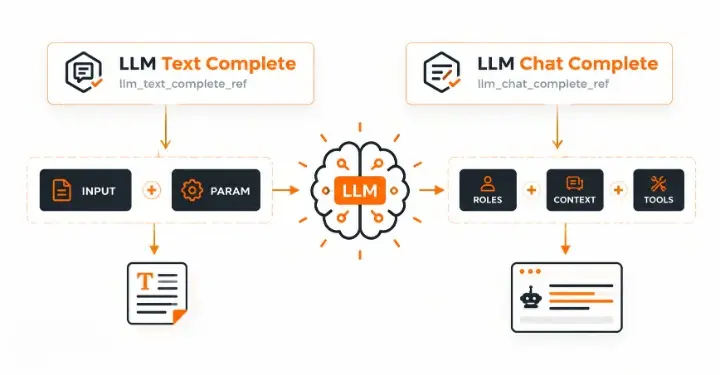
In plain language, llms.txt is a start-here page made for machines. A normal visitor sees our homepage. An AI tool may get lost there. This file tells it. These are our most useful pages.
It does not hide anything. It does not block anything. It only suggests. That is the part many people miss.
A typical file contains: A title: your brand or site name
- A summary: one or two lines on what you do
- Sections: groups like Services, Guides, or Pricing
- Links with notes: the URL plus a short line about the page
- An optional section: pages the AI can skip if space is tight
Why Do Websites Use llms.txt?
Websites use llms.txt to guide AI tools toward accurate, current pages. The goal is simple. If an AI tool answers a question about your business, you want it to use your best page, not an old one.
This matters most for sites with lots of content. Think of documentation sites, software tools, and agencies with many guides. A short list helps the AI pick the right page.
There is also a trust angle. If our pricing changed last month, we do not want an AI quoting the old price. A fresh llms.txt points to the current page.
Let us be honest, though. This is a proposal, not a guarantee. No AI company has promised to follow it. We cover that next.
Does Google use llms.txt?
No. Google has said it does not use llms.txt for Search or for its AI features. This is the most important fact in this guide. Many agencies still sell the file as an AI Overviews trick. That is not true.
On May 15, 2026, Google published a guide titled “Optimizing your website for generative AI features on Google Search.” It has been updated since then. The guide says you do not need special machine-readable files, AI text files, or Markdown to appear in AI search. Search Engine Journal covered it and noted that the guide also calls AEO and GEO still SEO.
There is earlier proof, too. Gary Illyes of Google said in July 2025 that Google does not support llms.txt and has no plan to, as reported by industry sites. In June 2026, Search Engine Journal reported that John Mueller of Google called the file speculative.
What about ChatGPT, Claude, Gemini, and Perplexity? Here we must be careful. Some blogs say Claude and Perplexity read the file. We could not find official confirmation from those companies. OpenAI has not confirmed support for ChatGPT either.
So what is the fair summary? Google says no. Other AI tools are unproven. The file is cheap, so many sites add it anyway, but it should never replace real SEO work.
To see how AI search really picks sources, read our guide on SEO content strategy for AI visibility.
What are the Benefits of llms.txt?
The main benefit of llms.txt is that it gives AI tools a short, clean list of your best pages at almost no cost. It is not a ranking boost. It is a small, low-risk helper. Here are the real benefits.
- It is quick and cheap to make. Most sites can build the file in under an hour. You do not need a developer or a paid tool. A text editor is enough.
- You choose which pages to highlight. At rankontechnologies.com, we publish many guides, from hotel SEO to Google Ads cost in India. The file lets us point to the most useful ones first. This is a suggestion, not a command.
- It forces a content audit. To write the file, you must decide which pages matter. This helps you spot old, thin, or duplicate pages. Many teams find this the most useful part.
- It can help with documentation and developer sites. Coding assistants often work with Markdown. A clean Markdown list suits that style well. This benefit is strongest for docs, APIs, and software tools.
- It keeps your key facts in one place. Your summary, services, and contact links sit together. This makes it easier to keep information consistent across your site.
- It is low risk. The file does not change how Google crawls or ranks you. If AI tools ignore it, you lose very little.
Remember the limits. Google says it does not use llms.txt. Support from other AI tools is unconfirmed, so treat these benefits as possible, not guaranteed.
What are the Disadvantages of llms.txt?
The biggest disadvantage of llms.txt is that no major search engine uses it and no AI company has confirmed they follow it. You may spend time on something that changes nothing. Here are the real downsides.
- Google does not use it. Google’s May 2026 guide says you do not need llms.txt to appear in AI Overviews or AI Mode. It will not help your Google visibility.
- Support is unproven. Claims about Claude, Perplexity, or ChatGPT reading the file are not officially confirmed.
- It is not an official standard. It is a community proposal from llmstxt.org. The rules may change, or the idea may fade.
- It needs regular upkeep. A stale file can point AI tools to dead links or old prices. For a site like ours that publishes often, this means a real review habit.
- It is hard to measure. You cannot easily see if any AI tool used the file. So you cannot prove it helped.
- It can create false confidence. Some owners add the file and skip real SEO work. Strong content, clear structure, and good EEAT matter far more.
- It is public. Anyone can open rankontechnologies.com/llms.txt and see which pages we promote. Just never list private or unfinished pages.
Pros and Cons of LLMs.txt at a Glance
Benefits | Disadvantages |
| Quick and cheap to create | Google does not use it |
| You pick the pages to highlight | Support from other AI tools is unconfirmed |
| Forces a useful content audit | Not an official standard |
| Fits docs and developer sites well | Needs regular updates |
| Keeps key facts in one place | Impact is hard to measure |
| Low risk to your SEO | Can distract from real SEO work |
Our view: Make llms.txt if you have time and your basics are strong. Do not make it your main AI search plan.
How is llms.txt Different From robots.txt and sitemap.xml?
Robots.txt controls access, sitemap.xml lists all URLs, and llms.txt suggests your best pages. People mix these up all the time. Each file has a different job.
| File | Where it lives on our site | Main job | Can it block bots? |
| robots.txt | rankontechnologies.com/robots.txt | Tells crawlers what they may visit | Yes (as a request) |
| sitemap.xml | rankontechnologies.com/sitemap.xml | Lists all important URLs for indexing | No |
| llms.txt | rankontechnologies.com/llms.txt | Suggest our best pages with notes | No |
An easy way to remember it: robots.txt is the security guard, sitemap.xml is the full map, and llms.txt is the friendly guide who says, Start here.
These files should agree with each other. If a page is blocked in robots.txt, do not list it in llms.txt. A clean site structure helps all three, and our post on website architecture for SEO explains how to organize pages.
What Does an llms.txt File Look Like? (RankON Technologies Real Example)
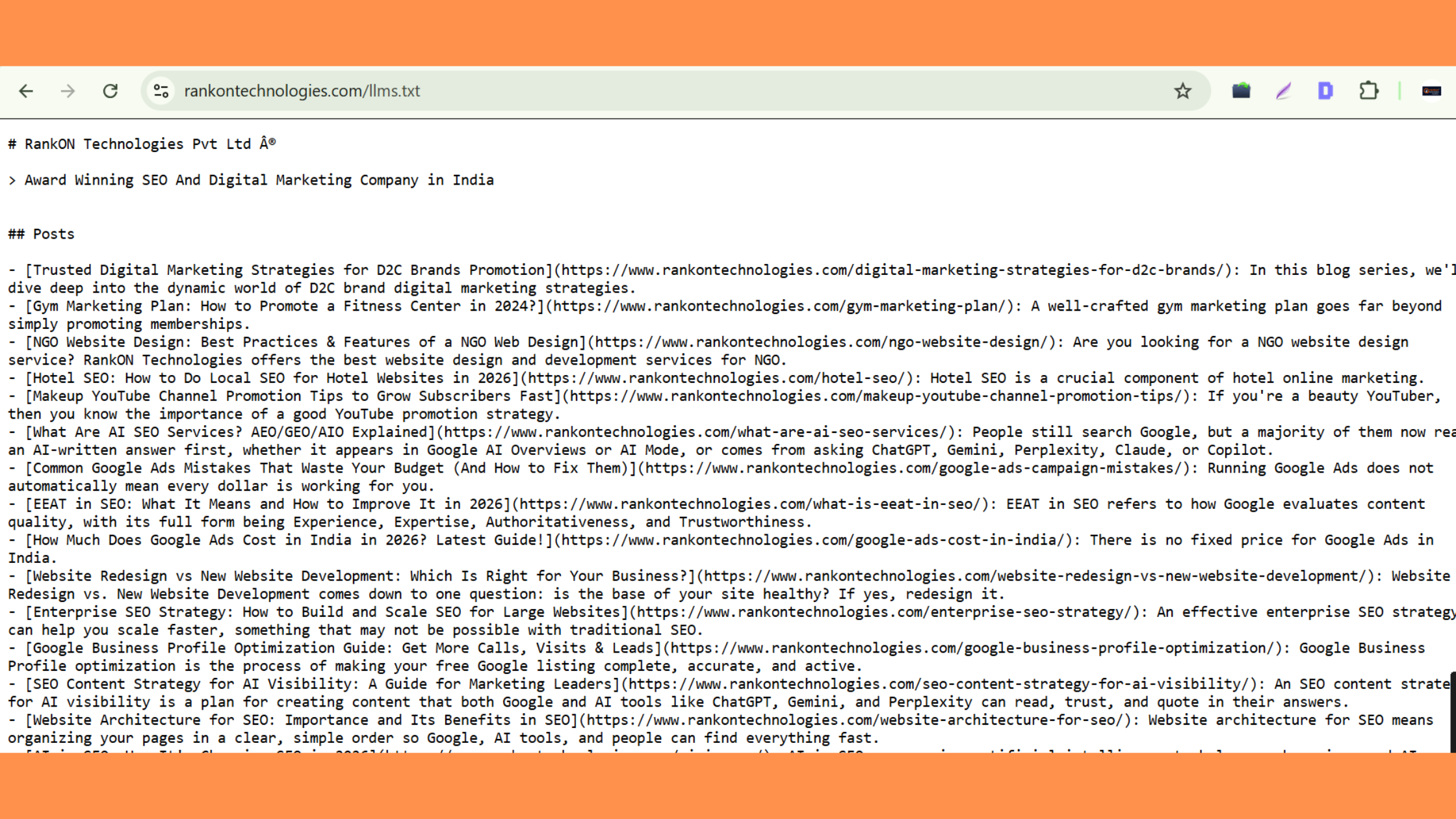
Here is a real example of llms.txt, which is shown in the screenshot below of Rankon Technologies Pvt Ltd👇
And here is Another Real Example of llms.txt, which isshowng in the screenshot below of Rankon Technologies Academy👇
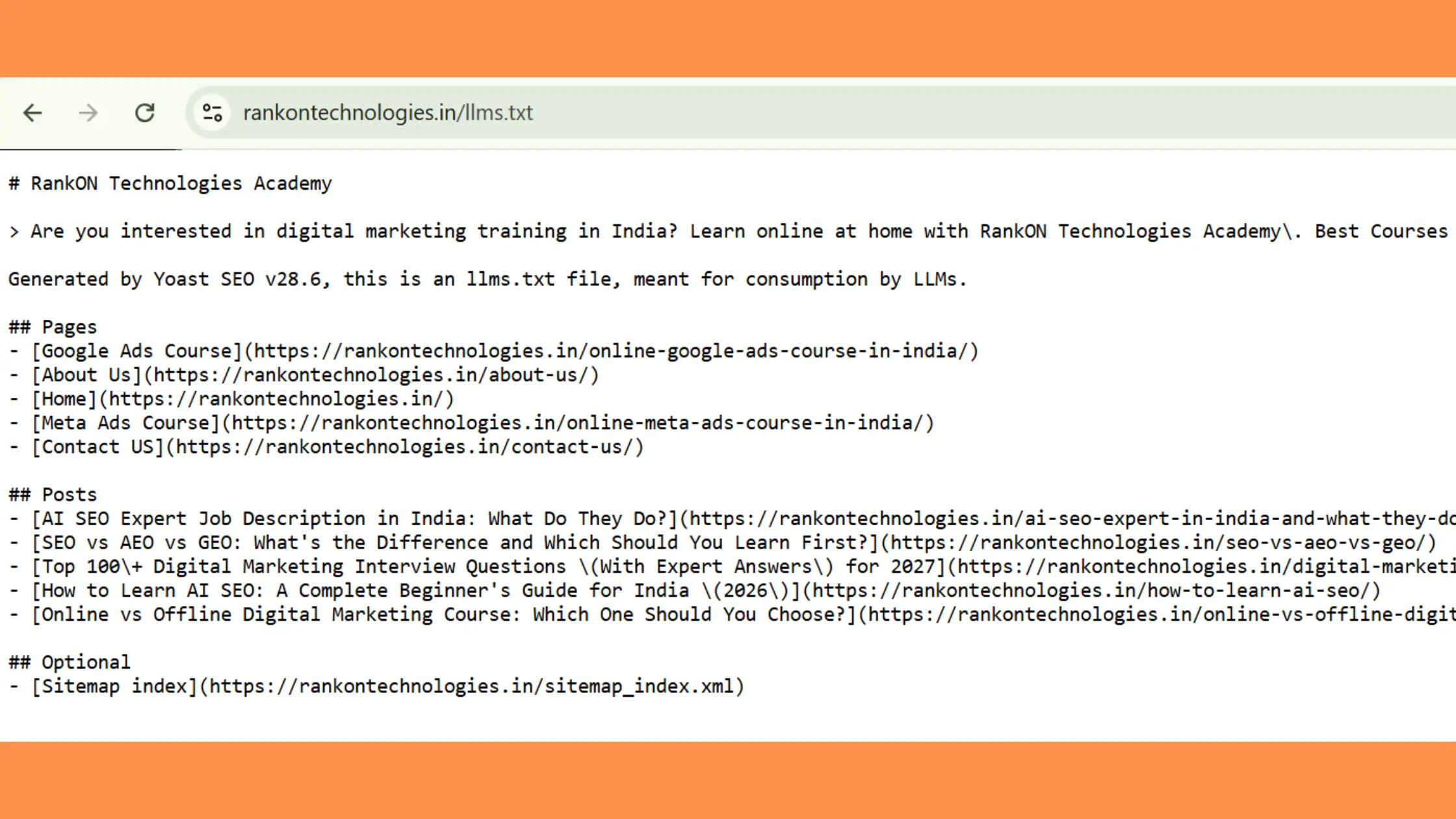
A real llms.txt file is just Markdown with a title, a summary, and link lists. We reviewed our own file at rankontechnologies.com/llms.txt. It works, but it is not as strong as it could be.
Here is what we noticed in the visible part of our file:
- A broken symbol. Our title shows “®” after “Pvt Ltd.” This is an encoding glitch. The ® symbol was saved in a different character format than the one the server reads.
- A very thin summary. The line under the title says only “Best Digital Marketing Company in India.” It is a claim, not a description. An AI tool learns nothing about what we do.
- Only a Posts section is visible. We want a clear Services section and a Contact or About section too.
- An old post. One link points to a 2024 gym marketing plan. Old posts can make a file feel stale.
- Uneven notes. Some notes are clean sentences. Another starts with “Quick Answer:” and reads like copied page text.
None of this breaks the file. But each point is a small trust leak. That is why we plan to clean it.
Here is a stronger version of our file. Replace the bracketed parts with our real URLs:
Here are the full details of the llms.txt file of RankON Technologies:
# RankON Technologies
> RankON Technologies is a digital marketing company in India. We offer SEO, Google Ads, website design, and content services for businesses and NGOs.
## Services
– [SEO Services]([add SEO service page URL]): Search engine optimization for local and enterprise sites
– [Google Ads]([add Google Ads page URL]): Paid search management and cost reduction
– [Website Design]([add web design page URL]): Business and NGO website design
## Guides
– [What Is EEAT in SEO](https://www.rankontechnologies.com/what-is-eeat-in-seo/): Meaning of EEAT and how to improve it
– [AI in SEO](https://www.rankontechnologies.com/ai-in-seo/): How AI is changing search
– [Google Ads Cost in India](https://www.rankontechnologies.com/google-ads-cost-in-india/): Cost overview for Google Ads in India
– [Google Business Profile Optimization](https://www.rankontechnologies.com/google-business-profile-optimization/): How to complete and improve your free listing
## Company
– [Contact]([add contact page URL]): Phone, email, and office details
## Optional
– [Hotel SEO](https://www.rankontechnologies.com/hotel-seo/): Local SEO tips for hotel websites
See the difference? The summary now explains the business. The links are grouped by purpose. Each note is short and clean. We do not claim to be “best” because AI tools cannot verify that.
To fix the symbol, save the file as UTF-8 and make sure our server sends it as plain text with UTF-8. Or simply remove the ® sign. The second choice is faster.
How Do You Create an llms.txt File Step by Step?
You create llms.txt by choosing your best pages, writing them in Markdown, and uploading the file to your root folder. The whole job takes under an hour for most sites.
Step 1: Pick your best 10 to 30 pages. Choose service pages, pricing, top guides, and contact info. Skip thin pages, test pages, and old news.
Step 2: Write a clear summary. Say who you are, what you do, and who you serve. Use plain facts. Avoid words like “best” or “number one.”
Step 3: Group your links. Use headings like Services, Guides, Company, and Optional. Put the most important group first.
Step 4: Add a short note to each link. Keep every note under 15 words. Write what the page contains, not a sales line.
Step 5: Save as UTF-8 and upload. Name the file llms.txt. Place it in the root folder so it loads at https://www.rankontechnologies.com/llms.txt.
Step 6: Test it. Open the URL in a browser. You should see plain text. A tool like curl should return a 200 status.
Step 7: Set a review date. Add a calendar reminder for three months later. This one habit keeps the file from going stale.
Many CMS platforms and SEO plugins can generate the file for you. That is fine. Just check the output by hand, because auto tools often include too many pages.
How Often Should llms.txt Be Updated?
Update llms.txt whenever a listed page, price, or URL changes, and review the whole file every three months. No official rule exists. Neither Google nor the llmstxt.org proposal gives a schedule. So we give you a practical one.
The reason is simple. A stale file does harm. It can point AI tools to dead links, old prices, or services you no longer offer. A small file that is always correct beats a big file that is often wrong.
When Should You Update It Right Away?
Update at once when a change affects facts, links, or what you sell.
What changed | Update needed? | How fast | What to do |
| A listed page URL changed or was deleted | Yes | Same day | Fix or remove the link |
| Pricing or plans changed | Yes | Within 2 to 3 days | Update the link and note |
| New service or product launched | Yes | Within a week | Add it to the right section |
| A service was stopped | Yes | Same day | Remove it |
| Website redesign or migration | Yes | Before launch | Re-check every link |
| Company name, address, or contact changed | Yes | Same day | Update the summary and company links |
| A normal blog post was published | Usually no | Only if it is a key guide | Add selectively |
| A small typo was fixed on a page | No | Not needed | Skip |
A redesign is the biggest risk. URLs often change, and old links break. If you are planning one, read our comparison of website redesign vs. new website development. Then add “update llms.txt” to your launch checklist.
What Is a Good Review Schedule?
Most sites should review llms.txt every three months. Fast-changing sites should review it every month.
Site type | Review rhythm | Why |
| Small business or local site | Every 3 months | Pages change slowly |
| Agency or services site (like ours) | Every 3 months, plus after new launches | New services and guides appear often |
| Online store or SaaS | Every month | Prices and products change often |
| Documentation or API site | With every release | Docs change with each version |
| Large enterprise site | Monthly, ideally automated | Many teams edit pages. See our enterprise SEO strategy guide |
A quarterly review takes about ten minutes. Use this mini checklist:
- Open every link. Does it load?
- Does each note still match the page?
- Are old posts still useful? If not, remove them.
- Is anything important missing?
- Does the file still agree with robots.txt and the sitemap?
If you manage hundreds of pages, automate it. Many setups can build the file from your sitemap or a list of “key pages.” Then it updates when your site does.
Our own plan is simple. We will review rankontechnologies.com/llms.txt every three months. We will also update it whenever we launch a new service page or change a URL.
What Are the Most Common llms.txt Mistakes?
The biggest mistake is treating llms.txt as a ranking trick. It is not one. Google has said so clearly. The other mistakes are easy to fix.
Content mistakes
- Listing everything. If you list your whole sitemap, the file loses its point. Be selective.
- Weak summaries. “Best company in India” tells a machine nothing. Say what you do.
- Salesy or long notes. Write facts and keep every note under 15 words. Do not paste the page’s first paragraph, as indicated by the “Quick Answer:” text in our file.
- Copying a competitor’s file. Your file should describe your own business and pages.
Technical mistakes:
- Wrong file name or case. Name it llms.txt in lowercase. Do not use LLMs.TXT or llms.md.
- Putting it in a subfolder. It must load at rankontechnologies.com/llms.txt, not in a blog or assets folder.
- Serving it as an HTML page. It should open as plain text. If it shows menus and a header, something is wrong.
- Encoding errors. Strange symbols like “®” look careless. Save the file as UTF-8.
- Mixed URL versions. Pick one version, such as https://www.rankontechnologies.com, and use it everywhere.
- Staging or test URLs. Check that every link starts with the live domain.
Maintenance and strategy mistakes:
- Leaving broken links. This happens most often after redesigns.
- Forgetting about it. A file that has not been touched for a year is probably wrong.
- Listing noindex or blocked pages. If a page is blocked in robots.txt or has a noindex tag, do not list it.
- Paying for false promises. Do not buy a tool that claims llms.txt boosts Google AI Overviews. Google’s own guide says it does not.
What Should You Do Instead for AI Search?
Focus on strong, helpful content and a crawlable site, because that is what Google says drives AI visibility. Google’s guide says that optimizing for AI search is still SEO. The basics matter most.
- Write original, useful pages. Answer real questions clearly.
- Show real expertise. Our guide to EEAT in SEO explains how to demonstrate experience and build trust.
- Keep pages crawlable and indexable. Check Google Search Console for errors.
- Use a clear site structure. Good internal links help people and bots.
- Use standard structured data where it fits. Do not invent special AI markup.
- Keep business facts consistent. For local brands, a complete listing matters. See our Google Business Profile optimization guide.
- Understand the bigger shift. Read how AI is changing SEO in 2026.
Llms.txt can be a small extra on top of this. It should never be the main plan.
Who Should Create llms.txt, and Who Can Skip It?
Create llms.txt if you run docs, a software product, or a content-heavy site. Skip it if you have a tiny site and limited time. The cost is low, so the choice is about priorities.
Good fit:
- Developer tools and API documentation
- SaaS and software companies
- Agencies and publishers with many guides, like ours
- Sites that want to try AI-friendly formats early
Can skip:
- Very small sites with five or six pages
- Teams that have not fixed basic SEO yet
- Anyone expecting a Google ranking boost
If you are unsure where to invest, our post on SEO agency vs. freelancer can help you plan. your next steps
Conclusion
What is llms.txt? It is a short, optional Markdown file that points AI tools to your best pages. Google does not use it, and proof of benefit on other AI tools is limited. Still, it is cheap and easy to make.
If you create one, keep it honest, clean, and fresh. Update it when pages, prices, or URLs change, and review it every three months. A small, accurate file is far better than a big, outdated one.
FAQs About llms.txt
What is llms.txt used for?
It gives AI tools a short, clean list of your best pages. It is a suggestion file, not a control file.
Is llms.txt required?
No. No search engine or AI company requires it.
Does llms.txt improve Google rankings?
No. Google has said it does not use llms.txt for Search or AI features.
Does ChatGPT read llms.txt?
OpenAI has not confirmed support. Treat any claim of a ChatGPT benefit as unproven.
How often should llms.txt be updated?
Update it when key pages, prices, or URLs change. Review it every three months.
Where do I put the llms.txt file?
Put it in your site’s root folder. For RankON, that means it loads at rankontechnologies.com/llms.txt.
How long should llms.txt be?
Keep it short. Ten to thirty links with brief notes is a good range.
Can llms.txt block AI from using my content?
No. It cannot block anything. Use robots.txt or server rules for that.
Sources and References
While writing this article, I referred to Google Search Central’s official guide, “Optimizing your website for generative AI features on Google Search”, published on May 15, 2026, and updated later. I also read Search Engine Journal’s article, “Google’s New AI Search Guide Calls AEO and GEO ‘Still SEO’”, to understand the discussion around Google’s guidance and llms.txt.
Regarding John Mueller’s comments, I found a June 2, 2026, Search Engine Journal report on llms.txt that discusses the topic. I also referred to an article on ecorpit.com that discusses Gary Illyes’s July 2025 statement.
The original llms.txt proposal by Jeremy Howard can be found at llmstxt.org.
I also came across blog posts discussing support for llms.txt in Claude, Perplexity, and ChatGPT. However, I could not verify these claims through official company sources, so I have treated them as unconfirmed rather than established facts.
These references helped me check the available information and develop my own understanding of llms.txt, its purpose, and how website owners can maintain it.