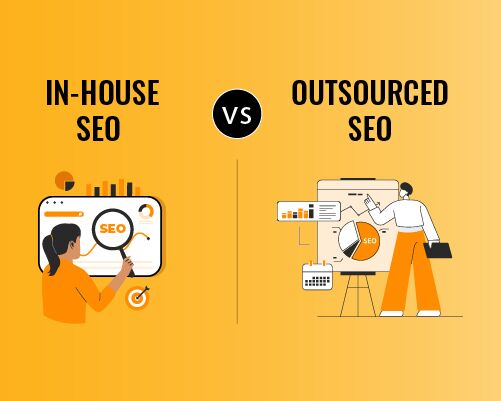
There could be plenty of instances where you might have used Google’s People Also Search For feature. However, beyond its simplicity, this highly effective feature can substantially shape SEO by highlighting related queries, expanding keyword opportunities, and improving topical relevance. To better understand its influence, let’s explore this ultimate guide to People Also Search For and focus on how it can impact your keyword research and content planning.
First, let’s explain what People Also Search For (PASF) means. Even though it might seem new, Google launched PASF back in 2018. The feature appears when you click a search result and then return to the results page.
Google handles over 5 trillion searches per year, about 14 billion per day. The People Also Search For feature leads to many follow-up, long-tail, and exploratory searches.
PASF shows up below the search result you clicked on in Google, giving you an easy way to find more related content.
While Google’s PASF feature is great for helping searchers get more accurate, relevant results, it also helps business owners understand user search behavior and expand their visibility on the Internet.
If you own a business, try looking at PASF queries for your main keywords. This can help you discover new related search terms, making your content strategy feel more proactive and innovative, helping you reach more people.
If you want to learn more about Google’s PASF feature, this guide will lead you through everything you need to know. Let’s get started.
People Also Search For Feature: What Is It Actually?
People Also Search For (PASF) is a Google feature that helps you keep searching if the first result doesn’t answer your question. When you click on a page and then go back to Google, PASF shows a list of related searches that others often look for in the next step.
Google sees this action as a sign to show search terms that match what you’re looking for. These suggestions might include related topics, different phrases, comparisons, or more detailed searches to help you learn more.
For businesses, PASF is a useful SEO tool. It shows how people change their searches and what they want to know next.
As a progressive SEO agency in India that isn’t afraid to experiment, we leverage the PASF feature to refine our content, find new keyword ideas, and build authority in search results for our clients.
People Also Search For Benefits & Importance: What it Brings to SEO and PPC Campaigns in 2026

As a one-stop digital marketing agency in India, we leverage Google’s People Also Search For feature to produce measurable results for our clients. By embedding PASF into our SEO strategies, we increase website visibility and impressions, and by using PASF insights in PPC campaigns, we improve conversion rates and results.
Below, we have shared the benefits PASF brings to SEO and PPC, as well as the PASF secrets we use to grow our campaigns.
Explore New Keywords
Google’s People Also Search For tool helps explore new keywords with high search volume and relevance.
From a technical perspective, PASFs are generated from user behavior signals, including click-through patterns, dwell time, semantic query relationships, and other metrics.
When a user clicks a result and instantly returns to the SERPs, Google dynamically displays PASF suggestions to sharpen intent. These could include long-tail, mid-tail, and entity-based keywords.
The keyword suggestions in PASF are not random; they’re semantically or contextually related to the initial search.
These keywords are valuable for:
- Exploring keyword clusters
- Strengthening semantic SEO
- Optimizing subheadings, FAQs, and supporting content
- Enhancing internal linking
Helps Understand Search Intent

Google’s PASF is important in validating user search intent. From a technical POV, PASF helps users pivot their queries after interacting with search results.
When users return to the SERP and select alternative queries in the PASF, it signals to Google that there is an intent mismatch or partial fulfillment. As a result, PASF poses queries that better align with users’ underlying goals.
As a skilled SEO agency in India, we use Google’s PASF for.
- Aligning content formats with user demands.
- Decreasing bounce rates and elevating dwell times for better intent matching.
Draw Comparison With Competitors
Google’s PASF helps you understand how users compare your brand with competitors. It includes competitor brands, alternative services, or comparison-based searches, which might include-
- Competing brands or businesses
- Alternative products or services
- “vs” or “best alternative searches.”
- Comparison and review-focused queries
Helps Understand People’s Opinion About Brands
Google’s People Also Search For helps reveal what people think about your business. It might help to understand public views and sentiment, identify concerns before making decisions, create content that builds trust, quality, and reliability, and improve brand messaging and reputation management.
By closely analysing, it helps to.
- Understand public perception and sentiment.
- Identify concerns users have before making decisions.
- Create content that addresses trust, quality, and reliability.
- Improve brand messaging and reputation management.
By analysing PASF results, you gain insight into real user opinions, enabling you to respond proactively and build stronger trust with your audience.
The Mechanics Behind People Also Search For on Google Searches

1. PASF Is Triggered by a Search Back Action
People Also Search For only appears after you click a search result and then go back to the Google results page. This tells Google that your search might not be finished.
2. Google Detects an Unresolved Search Session
When users return to the search page, Google sees this as an unfinished search. It then looks for other queries that people often search for next in the same session.
3. Related Queries Are Pulled from Search Path Data
PASF suggestions come from the searcher’s past search paths or sequences of queries.
4. Queries Are Filtered Using Relevance Signals
Before displaying PASF suggestions, Google filters queries based on:
- Semantic similarity
- Frequency of follow-up searches
- Contextual alignment
- Topical relevance to the original query
This ensures only closely related queries are shown
5. PASF Results Are Generated in Real Time
PASF queries are created in real time when you return to the search page. They aren’t preloaded or fixed, and can change depending on your search and how people search over time.
6. The System Intends to Pursue the Search Quest
PASF isn’t designed to rank websites or promote content. Its main goal is to help users keep searching and land on the information they’re looking for.
People Also Search For: SEO Benefits And How It Helps?
1. Defines Relationships in Google’s Index
People Also Search For reveals how Google groups related queries within a topic. Instead of treating keywords as standalone terms, Google connects them using shared intent, entities, and context.
For SEO professionals like us, PASF acts as a window into Google’s topical classification system, helping identify which queries belong in the same content cluster and which should be handled separately.
2. Identifies Natural Query Flows
PASF shows how searches evolve after an opening query. These progressions often trace predictable paths, such as moving from general information to clarification, comparison, or evaluation.
Apprehending these progressions allows SEO experts to structure content that aligns with real user search behavior rather than relying solely on static keyword lists.
3. Signals Content Coverage Expectations
When PASF consistently surfaces certain queries, it indicates Google expects those subtopics to be addressed somewhere within the wider topic ecosystem.
For SEO professionals, it is quite helpful to comprehend-
- Which subtopics require dedicated pages?
- Which queries can be covered within a single piece of content?
- Where content gaps exist within a site?
4. Supports Tactical Keyword Prioritization
PASF queries often represent secondary yet highly relevant search terms. While these keywords may not have the highest individual volume, they can generate significant cumulative traffic when included in well-structured content.
5. Guides Content Architecture and Internal Linking
Since PASF reflects how Google connects queries, it provides a practical framework for internal linking. Pages optimized for related PASF queries can be interlinked to reinforce authority and improve crawl efficiency.
Aligning search behavior with site structure helps search engines better understand content relationships.
Are There Any Specific Tools or Methods For Efficiently Extracting and Analysing PASF Data?

Since Google does not provide dedicated support for PASF analysis, you can use SERP observation and third-party SEO tools to strengthen your content and SEO strategy:
Manual SERP Triggering
By searching a target keyword and returning to the SERP after clicking a result, you can observe PASF suggestions in real time.
This approach can help you get a list of connecting queries within the same search session.
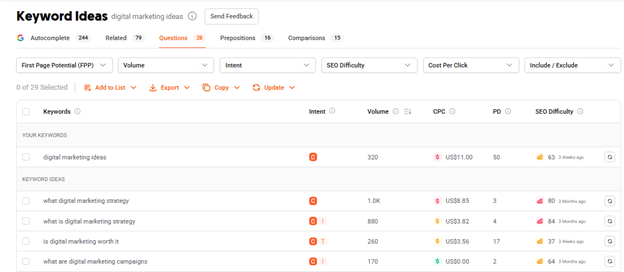
UberSuggest
UberSuggest provides related keywords and ideas that closely align with PASF patterns. These suggestions help identify long-tail and refinement queries, which can be directly included in the content strategy.
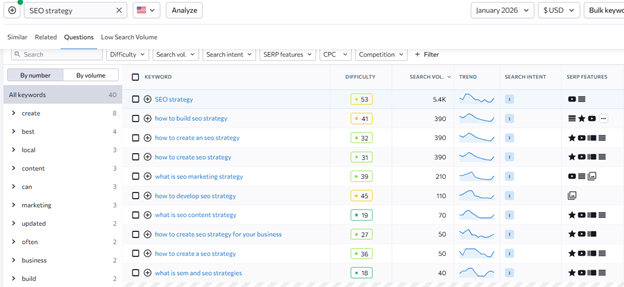
SE Ranking
SE Ranking offers keyword-suggestion groups and SERP-based insights that reflect query relationships, similar to PASF. It is particularly effective for mapping secondary keywords and validating topical relevance.
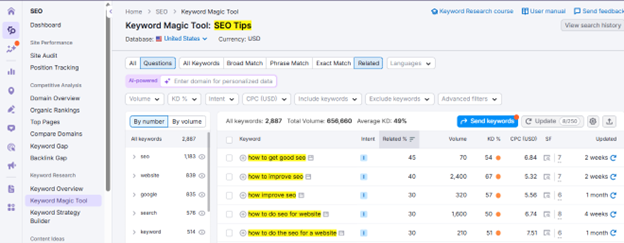
Semrush
Semrush analyzes PASF-like behavior through its Keyword Magic Tool, Related Keywords, and SERP analysis. These features help identify overlapping intent, competing URLs, and refinement-based searches.
How to Make PASF a Part of Your Broader SEO Strategy?
There are plenty of ways in which PASF can reinforce your SEO strategy. Check out some of the pragmatic SEO approaches where PASF can be your best friend!
Create a Keyword Bank:
When researching keywords, you not only have to rely on premium tools, but you can also take assistance from this free feature by Google to grow your keyword bank.
How To Do?
- Search your primary keyword on Google
- Click 3–5 top-ranking results
- Hit the back button and note the new queries Google shows (PASF)
- Add them to a shared sheet with columns:
- PASF query
- Search intent (informational/commercial/transactional)
- Target page (existing or new)
In this way, you can increase your keyword bank using the PASF.
Map PASF Queries To Existing Pages
You can optimize the current pages on your website and rank them for different keywords by using PASF. For this, you need to follow the simple process as given below:
For each PASF term, consider whether it can be inserted into your existing page.
If so, you can add it to the H2 or H3, or create a new section, an explanatory paragraph, or an FAQ.
If not, you can create a new page if it aligns with your business goals.
Rewrite Headings Using PASF Suggestions
PASF suggestions can work incredibly well for updating and optimizing. You can consider each heading individually and check whether the PASF suggestion fits naturally.
Use PASF Suggestions To Strengthen PASF Clusters
A pillar-cluster strategy ensures that a website has an SEO-optimized structure and clean navigation. You can make use of the PASF suggestion to strengthen this aspect of SEO as well.
How To Do?
Start with a pillar topic that sits at the top, for example: SEO services for small businesses.
Now search this topic on Google and click on 2 or 3 top-performing websites. After that, hit the back button, and you’ll have People Also Search For right in front of you.
Now, how do you incorporate it into your pillar-cluster content strategy, you ask? Check out below:
- Collect all the PASF suggestions in a worksheet.
- In the next step, analyze them one by one. You’ll find that not all of them are of the same type.
- In the next step, group them based on their intent and what users want to know when searching for them on Google, such as:
- Definitions – when users are trying to understand a concept better
- Comparisons – when they’re deciding between two options
- Timelines – when they want to know how long something takes
- Costs – when budget or pricing becomes a concern
- Tools – when they’re ready to take action or explore solutions
- Once grouped, know how to use them.
- You will find some of the PASF queries fit perfectly as new sections within your main pillar page. Others are more detailed and deserve their own supporting blog posts. When you link these supporting pages back to the pillar, you create a clear content cluster.
In this way, your content will start answering questions in the same order a real person thinks about them. Instead of ranking for just one keyword, your page becomes a helpful resource that covers the topic from every angle.
Validate People Also Search For Queries With Other SEO Tools
If you’re starting anew, you can use PASF suggestions as an initial checkpoint to determine whether you should explain the topic in more detail. PASF might give you raw signals of SEO curiosity, but SEO tools help you determine whether the search term actually has some potential.
How To Do?
To make it work, you can shortlist your PASF queries and quickly plug them into tools like SE Ranking, Semrush, or Ubersuggest. At this stage, you will receive basic confirmation that the query has impressions, related keywords, or ranking pages.
If the tool shows relevant SERPs and consistent keyword variations, the PASF query passes the checkpoint and can be safely incorporated into your content plan. If not, it may be better suited as a supporting mention rather than a primary focus.
Add PASF-Driven FAQs for Featured Snippets
Another effective way to use PASF suggestions is to incorporate them in the FAQs.
How To Do?
You can cherry-pick a PASF suggestion and create a FAQ question around it. After this, write a short answer of 30-50 words in a clear, neutral tone and update it on your webpage.
Where possible, apply the FAQ schema to these questions. This helps search engines understand your content’s structure and increases the likelihood that your answer will be pulled into a featured snippet or People Also Ask box, giving your page more visibility without requiring higher rankings.
Refresh Old Content Using Fresh PASF Signals
Search behavior keeps changing, and so do People Also Search For queries. That’s why PASF isn’t just useful for new content; it’s equally powerful for refreshing pages that already rank.
How To Do?
Start by revisiting your pages that are already performing well on Google. Search their primary keywords again and repeat the same process: click a few top-ranking results, then hit the back button to surface new PASF suggestions. You’ll often notice questions that didn’t exist earlier or weren’t relevant at the time you first wrote the content.
Once you collect these fresh PASF queries, review your page and see where updates make sense. This could include:
- Tweaking or adding new headings
- Updating examples to reflect current practices
- Expanding or rewriting sections that feel outdated or incomplete
Train Writers to Use PASF While Drafting Content
One of the best ways to incorporate PASF into your SEO strategy is to train your writers to write content that aligns with these suggestions.
How To Do?
Make PASF research a mandatory step in your content procedure. Before a writer starts drafting, ask them to:
- Search the main target keyword on Google
- Note down the People Also Search For suggestions
- Naturally, answer those questions within the content
Set a clear expectation; each long-form article should address at least 3–5 PASF queries, either as headings, sub-sections, or short explanatory paragraphs.
This approach pushes writers to think beyond a single keyword and focus on how real users explore a topic. As a result, content becomes more comprehensive, more helpful, and more powerful to rank at the top of SERPs.
Assess the Impact of PASF
An SEO strategy without proper assessment can be a complete waste of time and effort. Hence, we recommend that you regularly assess the impact of PASF on your website.
How To Do?
Use Google Search Console to fetch data on the pages where PASF has been incorporated. Look closely at-
- New ranking keywords that weren’t previously associated with the page
- Query diversification, where the page starts appearing for a wider range of related searches
- Average position improvements, even if rankings move gradually rather than sharply
In the next step, you need to compare the pages that were updated with PASF insights or that haven’t been optimized using PASF. You’re likely to find that the PASF-optimized pages are ranking for more and more relevant keywords. Even if traffic is low, an increase in relevant queries is a strong indicator that the page is better aligned with user intent.
What Can You Do To Manage Duplicate PASF?

As you proactively use PASF on your website, overlap is inevitable, which may even lead to cannibalisation and diluted rankings. However, you need not worry, as there are ways to manage these duplicates and mitigate risks properly. Check out here what you can do to manage duplicate PASF!
A Separate Landing Page For One Relevant Query
When multiple PASF queries share the same intent, consolidate them into one strong landing page. Use the primary query as your main keyword and naturally incorporate variations within headings, body copy, and FAQs. This keeps your content focused and helps one page rank for multiple related terms.
Show Preferred Version Using Canonical Tags
If similar PASF-driven content already exists across multiple URLs, use canonical tags to indicate the preferred version to search engines. This helps consolidate ranking signals, prevents duplicate content issues, and retains useful supporting pages.
Use PASF Insights to Merge or Refocus Content
Instead of redirecting unthinkingly, use PASF insights to decide which content deserves expansion and which can be merged. If two pages receive similar PASF queries, combine the strongest sections into a single updated page and reposition the other as a supporting article or an internal link.
Is it Possible to Perform Keyword Research Using the PASF Queries?
Yes, and that’s what most SEO experts do! PASF suggestions can work as an initial checkpoint for your keyword research strategy. Although you may not get metrics like search volume or keyword difficulty, it will provide you with real users’ search behavior.
These can work greatly to help you uncover-
- Related keywords users explore next.
- Follow-up questions indicating deeper intent
- Topic gaps your competitors may not be fully covering.
Step-By-Step Process To Know How To Perform Keyword Research Using PASF
Step 1: Enter Your Primary Keyword
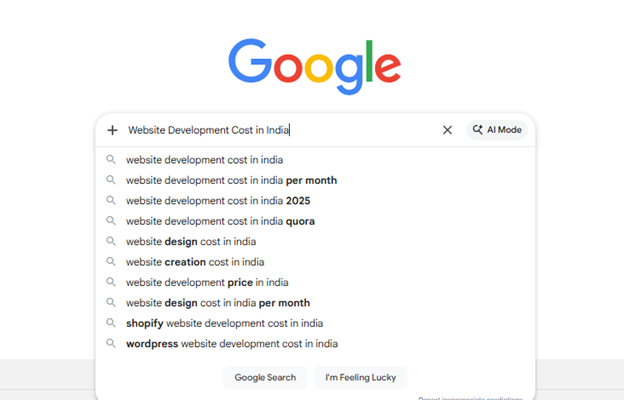
Start by entering your primary keyword that’s related to your product, service, or topic. This will act as the starting point for your further keyword research.
Step 2: Trigger PASF Suggestions
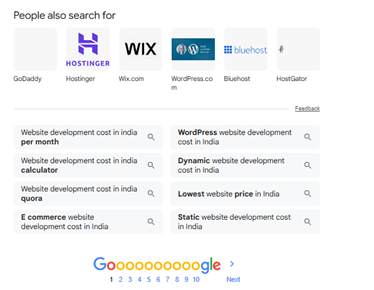
Once you enter the primary keyword on Google, click on one or two top-performing results and hit the back button to trigger the PASF suggestions. Now analyze and observe the PASF suggestions shown.
Step 3: Enlist All the PASF Queries
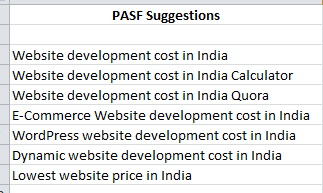
Record all the PASF queries in a worksheet. Repeat this step several times to have a PASF keyword bank.
Step 4: Categorize the PASF Queries By Intent
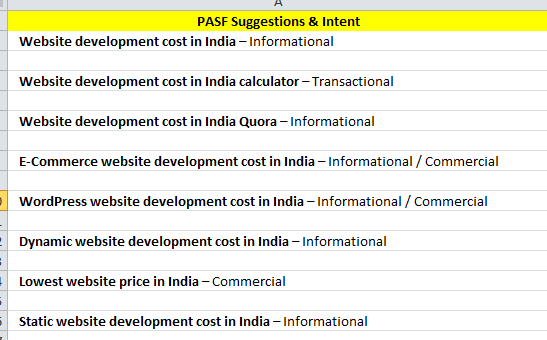
In this step, categorize all PASF queries by intent. Some of them can be informational, some commercial, and some navigational or transactional.
Step 4: Categorize the PASF Queries By Intent
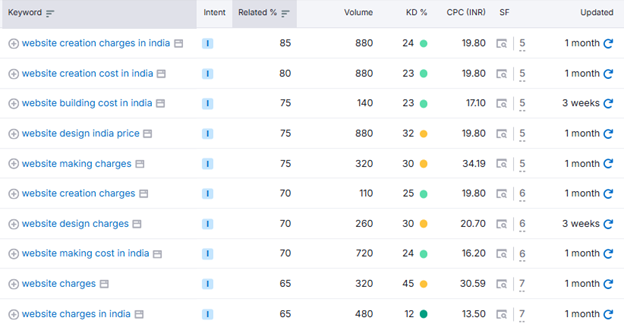
You can’t make PASF suggestions directly a part of your SEO strategy. You might need to validate the acquired data using other keyword research tools, such as Semrush, SE Ranking, Ahrefs, and others. This will help you understand various key metrics, including search volumes, keyword variations, and more.
Step 6: Prioritize Keywords for Content Mapping
Based on validation, allocate PASF to different content types.

For example:
- You can use core or high-intent queries for pillar or main pages.
- You can use supporting queries in cluster pages, sub-sections, blogs, or FAQs.
This carefully crafted strategy will prevent keyword cannibalization and improve content structure.
Step 7: Implement Keywords in Content
Once the PASF queries are validated, incorporate them naturally into your content rather than forcing them in. Use the most relevant PASF terms in headings and subheadings where they fit contextually, and support them with clear explanations within the body content.

PASF queries that are question-based work especially well in FAQ sections, while closely related terms can be connected through internal links to strengthen topical relevance.
Instead of optimizing a page for a single keyword, focus on covering a cluster of related PASF queries, enabling the page to rank for multiple variations while delivering a more complete, user-focused experience.
Challenges When Optimizing for PASF and Measures To Mitigate Them

It is not that you will collect the PASF suggestions, incorporate them into your content and SEO strategy, and see your rankings, traffic, and conversions grow overnight.
There could be plenty of challenges you might come across when using PASF suggestions for your website. These shall include-
1. Lack of Search Volume and Difficulty Fetching Data
Challenge:
PASF suggestions lack critical SEO metrics such as search volume, keyword difficulty, or conversion rate. This makes it difficult to prioritize which PASF terms deserve deeper coverage.
How to Mitigate:
Validate shortlisted PASF suggestions using SEO tools like SE Ranking, Semrush, or Ubersuggest before implementing changes.
2. Content Overlap and Keyword Cannibalization
Challenge:
Many PASF queries are closely related and share the same intent. Creating separate pages for each variation can result in multiple pages competing with one another.
How to Mitigate:
Categorize PASF queries by intent and consolidate them into fewer, stronger pages. Use one primary page per intent and support it with internal linking instead of multiple similar URLs.
3. Changing PASF Suggestions Over Time
Challenge:
Another critical challenge with PASF suggestions is that they are dynamic and depend on the user’s search behavior. Also, the queries that might appear today might not necessarily appear a few months down the line.
How to Mitigate:
Re-check PASF signals periodically, especially for important pages. Refresh content by adding new PASF-driven sections and removing or updating outdated ones.
4. Misalignment With Search Intent
Challenge:
Not every PASF query aligns with the purpose of your page. Adding irrelevant PASF terms can dilute content focus and confuse search engines.
How to Mitigate:
Analyze the intent behind each PASF query and include only those that naturally fit the page’s goal. Others can be addressed through separate pages or FAQs.
5. Over-Optimization and Forced Keyword Usage
Challenge:
Including too many PASF queries can lead to unnatural language and poor readability.
How to Mitigate:
Incorporate PASF terms naturally within headings and content flow. Focus on answering the underlying question rather than repeating the exact phrase.
People Also Search For vs. People Also Ask

What is Google’s People Also Ask?
Now that we’ve already discussed People Also Search For suggestions in-depth, how you can incorporate it in your SEO strategy, and what measures you can take to mitigate the challenges, let’s understand another key feature you might have definitely come across in Google’s SERPs, i.e., “People Also Ask For”.
The People Also Ask (PAA) feature in Google’s SERP is triggered when Google detects that the user may need more clarification to make a decision. It is driven by large-scale analysis of user behavior, intent patterns, and last but not least, query relationships.
Here are a few scenarios when People Also Ask gets activated:-
When the Search Query is Broad:
When a search term can have different meanings, and Google may get confused about which results to show, it instead shows PAA so the user can explore multiple directions.
When People Commonly Ask More Questions:
Google learns users’ behavior by analyzing their activity. If many people ask similar follow-up questions, Google adds those questions to the PAA box.
When Google Detects That the User is Coming to Learn a Topic:
PAA appears mostly for informational searches, this usually happens when users are exploring a subject, trying to understand concepts, or looking for explanations rather than a quick, final answer.
When the Search Query Has Many Parts:
When the search query has more than one question, Google’s People Also Ask feature is triggered to break the topic into smaller, related questions. This helps users explore each step of the query one step at a time.
When Google Wants To Guide The User Further:
When Google senses that a user may need more direction to understand a topic fully, it shows the People Also Ask box to guide them to the next logical questions. These questions are based on what other users typically search for next, helping the user move deeper into the topic without starting a new search.
PASF vs. People Also Ask For
While both features share the same goal: to help the searcher find the most relevant answers in the least time, they work in slightly different ways and appear at different stages of the search journey.
Here are a few factors on which they differ:
Main Purpose-
PASF: It helps users know what to search next. It appears when the user isn’t satisfied with the search results and comes back. The suggestions are based on what other people search for in the same scenarios.
PAA: It helps users get clarity from all directions. It shows common questions related to the search query right on the results page, without the user needing to click anything.
Kind of Content Do They Support-
PASF: People Also Search For works best for expanding a topic, covering related subtopics, creating content clusters, and more.
PAA: People Also Ask works for FAQ sections, short, direct answers, appearing in featured snippets, and answering common doubts clearly.
Help With Keyword Research
PASF: PASF shows you how people naturally move from one query to another. It’s great for finding related keywords, content gaps, and topics you may not have thought of.
PAA: PAA highlights the most frequently asked questions. It helps you understand what users want clarified immediately.
Incorporation in SEO Strategy
PASF: You can use it when you want to determine what topics to cover next, which subtopics deserve their own sections or pages, and how to strengthen the pillar and cluster content.
PAA: Use PAA when you want to add meaningful FAQs, improve your site’s AEO, appear in featured snippets, and answer user questions quickly and clearly.
From the above comparison, you might have observed that both features serve different purposes. On one hand, where PASF helps you go wider, PAA helps you go clearer. By strategically leveraging both of these features and integrating them into your SEO strategy, you can significantly improve your website’s visibility, traffic, and content depth.
RankON’s Practical Framework for Using PASF
Turning One Page into a Multi-Keyword Growth Engine
Pages optimized with PASF insights perform better and rank for multiple keywords, significantly increasing organic reach and impressions.
At RankON Technologies, our SEO experts never fail to incorporate the virtues PASF can offer to our clients’ business websites. We carefully filter suggestions from Google’s PASF, cross-check them with other powerful SEO tools, and then embed them into our SEO or content marketing strategy.
Creating Algorithm-Proof Search Visibility
SEO pages centred around the PASF suggestions are usually less volatile to search rankings. This is because they’re focused on multiple keywords.
This creates stability and reduces ranking fluctuations caused by algorithm updates, ensuring consistent visibility even when dynamics evolve. The expert SEO team at RankON Technologies understands this well and builds content strategies that prioritize intent coverage and long-term search resilience rather than short-term keyword wins.
Enhancing Visibility Where Purchase Decisions Are Made
PASF often shows competitor names, alternatives, and comparison-based queries, indicating that users have entered the evaluation stage of their journey.
By analyzing and incorporating PASF-driven comparison signals, RankON helps businesses address alternatives within content. You can also use it to improve visibility and influence decision-making when users are struggling to choose between competing solutions.
Final Words
The People Also Search For feature by Google reflects how users think after dissatisfaction, not just what they initially search for. This can help you make your content more relevant, useful, and aligned to how users use search engines.
At RankON Technologies, PASF is an integral part of our core SEO Performance Blueprint, helping us refine content naturally, cover related queries, and strengthen overall SEO performance.
As a skilled SEO agency, every small SERP feature can create a major difference in the overall search strategy when it is understood and analyzed well. When optimizing our clients’ campaigns, we ensure that nothing slips through the cracks and every opportunity drives growth.
Get in touch with us to experience how effective SEO services can drive growth!
FAQs on People Also Search For
What challenges can I face when optimizing my website with PASF?
When optimizing for PASF, things can get overwhelming due to its dynamic nature, frequent changes, and varying user intent. Since PASF suggestions evolve based on user behavior, keywords can quickly become competitive and irrelevant.
To fix, you should not rely solely on PASF; instead, validate it with other tools and develop a holistic SEO strategy that complements them.
What analytics tools can I use to track the performance of PASF-generated keywords?
You can use the following tools for the purposes given below:
- Google Search Console – Track impressions, clicks, and PASF-related queries
- Google Analytics – Measure traffic, engagement, and conversions
- SE Ranking / Semrush / Ahrefs – Monitor keyword rankings and visibility
How can I conduct keyword research using PASF recommendations?
Keyword research using People Also Search For (PASF) starts with a seed keyword relevant to your topic. When you search this keyword on Google, PASF suggestions appear at the bottom of the results page, revealing related queries users commonly explore next.
By repeating this process with new PASF keywords, cross-checking them with SEO tools, and categorizing them based on search intent, you can identify content gaps and build a more targeted content strategy.
How does People Also Search For look in Mobile SERPs?
On mobile SERPs, People Also Search For appears as a small list of related search suggestions that appears when you tap on some result and instantly returns to Google.
Instead of showing as a full box, it often looks like simple clickable suggestions that help users quickly refine or continue their search without typing a new query.